NDVI, the Normalised Difference Vegetation Index, is the most widely used measure of green vegetation from satellite imagery. It turns two bands of a multispectral image, red and near-infrared, into a single number for every pixel that shows how much healthy, photosynthesising vegetation is on the ground.
This guide explains how NDVI works, how to read the values and where it misleads, using imagery over two Australian sites: a coastal estuary in northern New South Wales and rangeland in Western Australia.
Key takeaways
- NDVI = (NIR − Red) / (NIR + Red). Values run from −1 to +1, and the higher the value, the more green vegetation in the pixel.
- Water is usually negative, bare ground and buildings sit near zero, and dense green canopy is typically above 0.6.
- NDVI measures greenness, not ground cover. Dry grass and stubble, which cover much of inland Australia for most of the year, read as low NDVI even when the ground is well covered.
- Free Sentinel-2 NDVI at 10m suits paddock, catchment and regional trends. Commercial high-resolution imagery resolves individual trees, rehabilitation plots and narrow riparian strips.
What does NDVI measure?
Healthy leaves treat red and near-infrared (NIR) light very differently:
- Red light is absorbed. Chlorophyll absorbs strongly in the red part of the spectrum to drive photosynthesis, so green leaves reflect little red light.
- Near-infrared light is reflected. The internal cell structure of a leaf scatters NIR strongly, so healthy leaves reflect much of it back to the sensor.
Bare soil, rock, roofs and roads reflect red and NIR in similar amounts. Water absorbs NIR almost completely. NDVI captures that contrast in one number:
Formula: NDVI = (NIR − Red) / (NIR + Red)
Range: −1 to +1, calculated per pixel from surface reflectance
Dividing by the sum normalises the result, so NDVI stays comparable across pixels that are brighter or darker overall, such as a sunlit slope and a shaded one. The index was first described in the early 1970s using data from Landsat 1, and has been a standard vegetation measure ever since.
How to read NDVI values
There is no universal "good" NDVI value. It depends on the vegetation type, the season and the sensor. As a general guide:
Treat these ranges as a starting point. A value of 0.3 might be a healthy result for a rehabilitated waste dump in the Goldfields and a poor one for an irrigated crop on the Darling Downs. NDVI is most useful when it is compared: against a reference site, against the same place last year, or across a time series.
NDVI on real Australian imagery
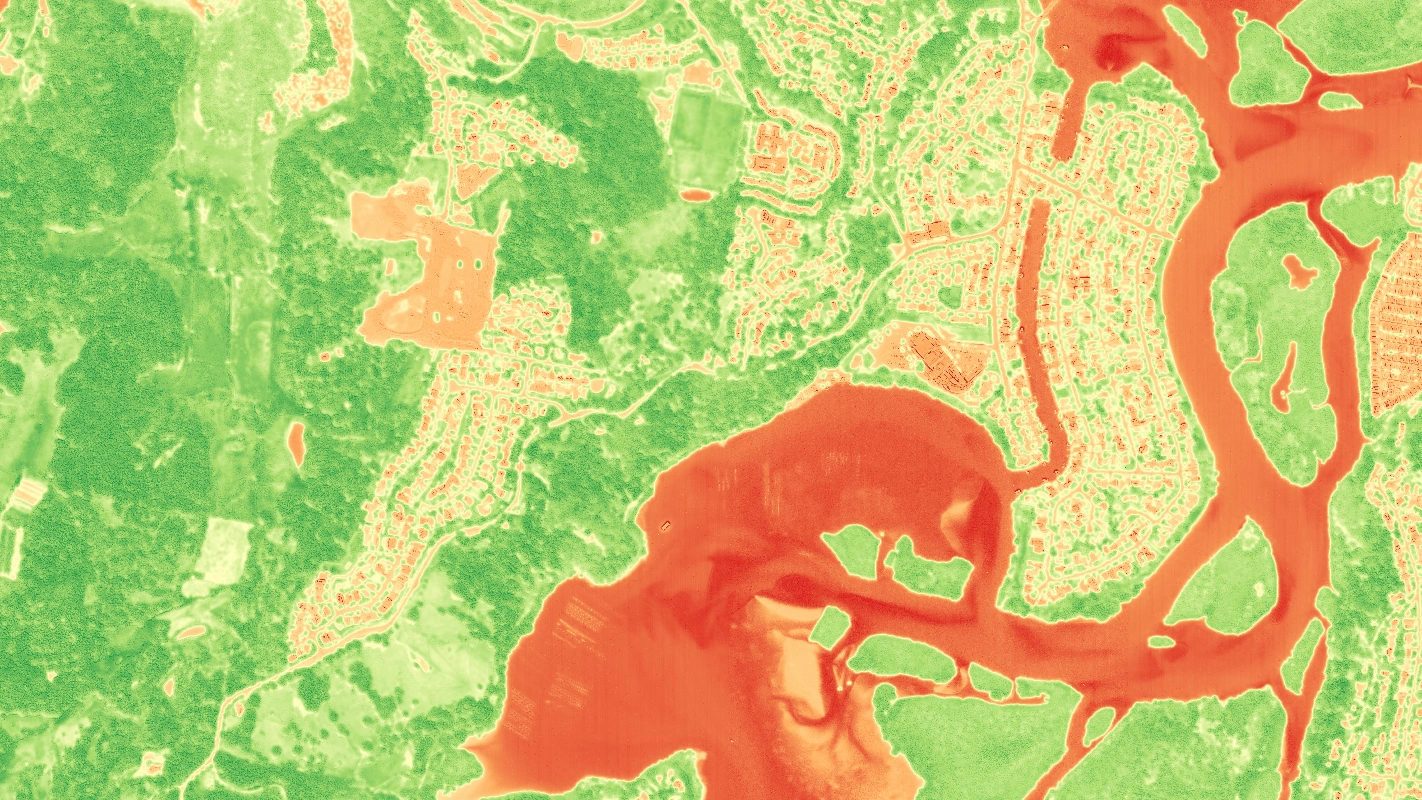
Tweed, New South Wales: high-resolution NDVI
The first example covers part of the Tweed estuary in natural colour (RGB), colour-infrared (CIR) and NDVI.
Natural colour (RGB)
Colour-infrared (CIR)
The colour-infrared image is the step between natural colour and NDVI. It displays the NIR band in the red channel, so anything reflecting strongly in near-infrared shows up red. Bushland and mangroves are a deep red, and the playing field near the top of the frame is a paler pink: mown grass has less leaf area than a full canopy.
Reading the NDVI image:
- The estuary and channels are the lowest values in the scene. Water absorbs near-infrared, so NDVI goes negative.
- The construction site on the left reads as low as the roofs and roads around it. Stripped ground has no green cover, so this is how NDVI tracks clearing and earthworks.
- The mangrove islands read as strongly as the bushland on the hills. Mangroves are dense, evergreen canopy, which is why NDVI is a common tool for mapping mangrove extent and dieback.
- The playing field is a lighter green than the surrounding trees, matching the CIR image. NDVI separates turf from canopy, and street trees show up as green dots across the suburbs.
At this resolution NDVI works at the scale of individual trees, gardens and rehabilitation plots. WorldView Legion captures its multispectral bands at about 1.4m at nadir, and they are often pansharpened to 30cm-class for display. For quantitative work, many analysts calculate indices from the native multispectral bands, because pansharpening can shift spectral values slightly.
Mt Kinahan, Western Australia: free Sentinel-2 NDVI
The second example is a much larger area of rangeland at Mt Kinahan, captured by the free Sentinel-2 mission at 10m.
Natural colour (RGB)
NDVI
Here NDVI tells a different story:
- Creek lines are the highest values in the scene. Trees along watercourses reach groundwater and stay green when the surrounding country has dried off, so NDVI traces the drainage network clearly.
- The sandy river bed is the lowest. Dry sand and shallow water both read low.
- The dark patches in natural colour read low in NDVI. They look like fire scars, which are common across northern Australia in the dry season. Burnt ground has lost its green cover, but bare rock and dry grass can read just as low, so NDVI alone can't tell you why a patch is low. Burn mapping uses the Normalised Burn Ratio instead, covered in our guide to band combinations and indices.
- Most of the open country sits in a narrow, low-to-moderate band. That is typical of Australian rangeland, and it is where NDVI is hardest to interpret, as the next section explains.
At 10m, each Sentinel-2 pixel covers 100m², so a narrow strip of riparian trees blends with the ground around it. That is fine for trends across a catchment or a lease, but too coarse to assess a single rehabilitation plot.
Where NDVI misleads in Australian landscapes
Most NDVI guidance is written for crops and temperate forests. Australian conditions break some of its assumptions.
- Dry vegetation reads like bare ground. NDVI responds to green, photosynthesising leaves. Senesced grass, spinifex in a dry spell and crop stubble cover the ground but contribute little to NDVI. A paddock with good dry cover and a scalded one can return similar values. Digital Earth Australia's fractional cover product separates green vegetation, dry (non-photosynthetic) vegetation and bare soil for this reason.
- Soil brightness skews sparse vegetation. Where plants cover only part of the pixel, the soil underneath dominates the signal, and bright red or pale soils shift NDVI up or down. The Soil Adjusted Vegetation Index (SAVI) corrects for this, as described below.
- Dense canopy saturates. Above about 0.8, NDVI stops rising even as the canopy keeps thickening. In rainforest, mangroves or irrigated crops, NDVI can't separate good from very good.
- Seasons swing values widely. Northern Australia greens up in the wet season and dries off in the dry. Compare the same season year on year, not a wet-season baseline with a dry-season repeat.
- Cloud, smoke and shadow corrupt values. Thin cloud and bushfire smoke lower NDVI and can look like vegetation loss. Mask them before analysis.
- Different sensors give different values. Satellites define their red and NIR bands slightly differently, so the same paddock can read a little differently on Sentinel-2, Landsat and WorldView. Avoid mixing sensors in one time series without calibrating between them.
Note: Colours are not values. NDVI images are usually colour-stretched to their own scene, so unless a colour bar shows the numbers, the same shade of green in two images can mean different values. For comparisons, work from the NDVI values, not the rendered colours.
Other vegetation indices and when to use them
NDVI is the default, but several related indices fix specific weaknesses.
NDRE needs a red edge band. Sentinel-2 has three at 20m, and WorldView Legion has two in its multispectral set, so both can produce NDRE. EVI needs surface reflectance values, not raw image values. The Modified Soil Adjusted Vegetation Index (MSAVI2), which removes the need to choose L, is covered in our band combinations and indices guide.
NDVI band formulas by satellite
NDVI can be calculated from any sensor with red and near-infrared bands. The band numbers differ:
Always calculate NDVI from atmospherically corrected surface reflectance. Indices calculated from raw digital numbers or from a display-ready RGB export are not comparable between dates. To try it yourself, start with our guide to adding satellite imagery to QGIS, then use the Raster Calculator with the formula for your sensor.
Free or commercial imagery for NDVI?
The two examples above show the trade-off.
- Free imagery (Sentinel-2, Landsat) suits regional trends, long time series and large areas. Sentinel-2 revisits Australia about every five days and the Landsat archive goes back to the 1980s, which makes it the right choice for questions like "how has vegetation cover changed across this catchment since 2017?" The limits are pixel size and cloud: a cloudy week can mean waiting for the next pass.
- Commercial high-resolution imagery suits site-scale questions: individual trees, rehabilitation plots, narrow riparian strips, urban canopy and vegetation clearance near infrastructure. Satellites can be tasked for a specific date and window, which matters when a report is due.
Many programs use both: free imagery to watch the whole area and spot change, then high-resolution imagery to look closely where something has changed. Our comparison of commercial vs free satellite data covers the trade-offs in more detail.
How is NDVI used in Australia?
- Mine rehabilitation. Rehabilitated areas are compared against undisturbed reference sites to show that vegetation is establishing toward closure criteria. SAVI is often preferred early on, when cover is sparse. See mine site monitoring across the lifecycle and our mining solutions.
- Environmental compliance and offsets. NDVI time series show whether vegetation in an offset area or buffer is holding, recovering or declining, with a repeatable record for reporting. See environmental monitoring with satellite imagery.
- Agriculture and pasture. Growers and agronomists track crop vigour and pasture growth through the season and find underperforming parts of a paddock.
- Bushfire and drought recovery. Repeat NDVI shows how quickly vegetation returns after fire or drought, alongside burn-specific indices. See satellite imagery for government and emergency response.
- Urban canopy. Councils use high-resolution NDVI to map tree canopy and green cover across suburbs, as the street trees in the Tweed example show.
- Wetlands and mangroves. NDVI maps mangrove extent and dieback along the coast, often paired with water indices such as NDWI.
Frequently asked questions
What does NDVI stand for? Normalised Difference Vegetation Index. It is the normalised difference between near-infrared and red reflectance, used as a measure of green vegetation.
What is a good NDVI value? It depends on the vegetation and season. Dense, healthy canopy is typically above 0.6, but healthy arid rangeland may never exceed 0.3. Compare against a reference site or the same site over time rather than a fixed threshold.
Can NDVI be negative? Yes. Water, cloud and snow reflect more red than near-infrared, so they return negative values.
Is NDVI the same as vegetation health? Not exactly. NDVI measures greenness, which tracks leaf area and chlorophyll. Low NDVI can mean stressed vegetation, but also dry-season grass, sparse cover or bare ground. Field checks or other indices are needed to tell them apart.
Can I get NDVI for free? Yes. Sentinel-2 and Landsat data are free, and Digital Earth Australia publishes analysis-ready versions for the whole country. Commercial imagery is needed when the question is smaller than a 10m pixel or must be answered on a specific date.
What is the difference between NDVI and NDRE? NDRE replaces the red band with a red edge band. Red edge light penetrates further into the canopy, so NDRE keeps responding in dense crops where NDVI saturates and can pick up stress earlier.
Get NDVI for your site
Terrabit delivers analysis-ready multispectral imagery, corrected to surface reflectance, with NDVI and other indices on request. We can pair free Sentinel-2 time series with high-resolution captures where the detail matters, and search the archive over your site in Albatross to see what already exists.
Explore our environmental solutions or send us your area of interest for a quote.